Meet the Corner Marker ◤
Posted: 17 Feb 2026, 17:07
Hello again, Community!
Simpler, smarter, and more intuitive.
Today we’re bringing you a small but handy update in LITERA Reader.
We’ve made it easier to interact with quotes and notes right in the book content:
If a quote has a note, just click the corner marker ◤ (placed at the beginning of the quote, right before the first word) — and it will take you straight to that quote in the Social Activity panel .
.
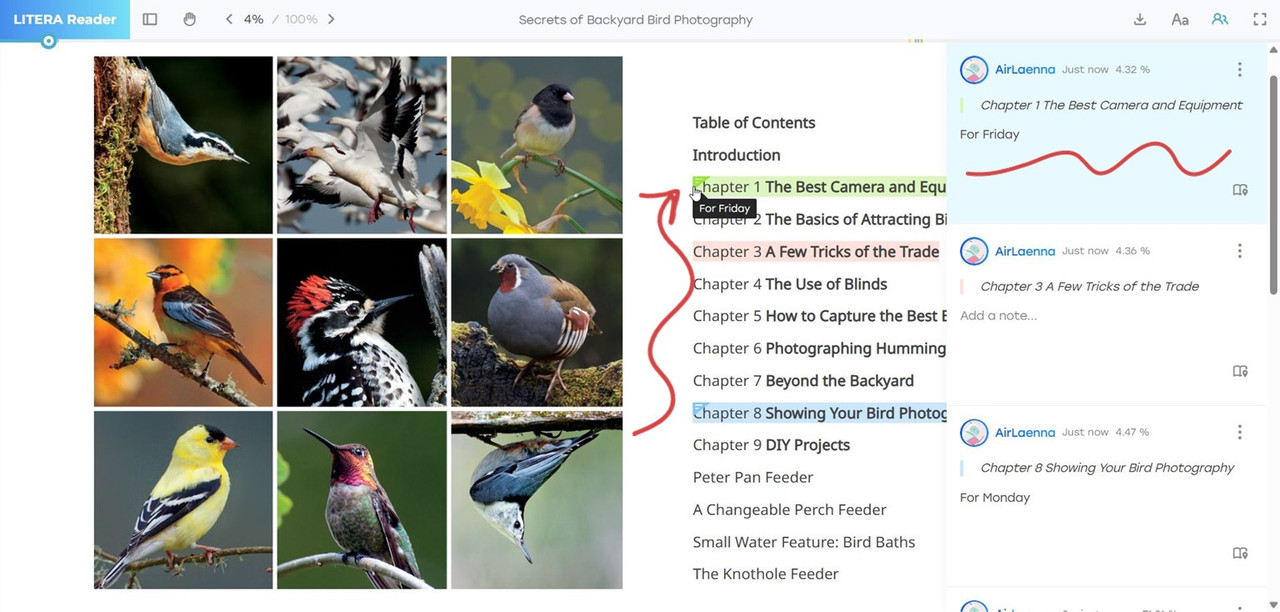
Double-click the corner marker, and you can immediately edit the attached note.
Simple gestures that save time and keep your reading even more comfortable.
Click. Edit. Done.
(At the moment, corner markers are available in the web version of LITERA Reader. Support for mobile is on our list and coming later.)

See it in the screenshots.
Stay in our Flow — new things are on the way!
Your LITERA Reader.
Simpler, smarter, and more intuitive.
Today we’re bringing you a small but handy update in LITERA Reader.
We’ve made it easier to interact with quotes and notes right in the book content:
If a quote has a note, just click the corner marker ◤ (placed at the beginning of the quote, right before the first word) — and it will take you straight to that quote in the Social Activity panel
 .
.Double-click the corner marker, and you can immediately edit the attached note.
Simple gestures that save time and keep your reading even more comfortable.
Click. Edit. Done.
(At the moment, corner markers are available in the web version of LITERA Reader. Support for mobile is on our list and coming later.)
See it in the screenshots.
Stay in our Flow — new things are on the way!
Your LITERA Reader.